Cellarscript (Cellars All the Way Down)
A downloadable game and language
Cellarscript / Cellars All The Way Down
Note: this is the demo release for the Langjam Gamejam submitted just under the wire. Updated documentation and (maybe) bug fixes will hopfeully come later.
Cellarscript is a stack-based language for creating and playing 2d block-based dungeons.
Cellarscript and related game Cellars All the Way Down is inspired by Puzzlescript, LOGO, Forth and Teletype and written (hastily) in L5 (Lua with Love2d) during the Langjam Gamejam 2025.
Cellars All The Way Down
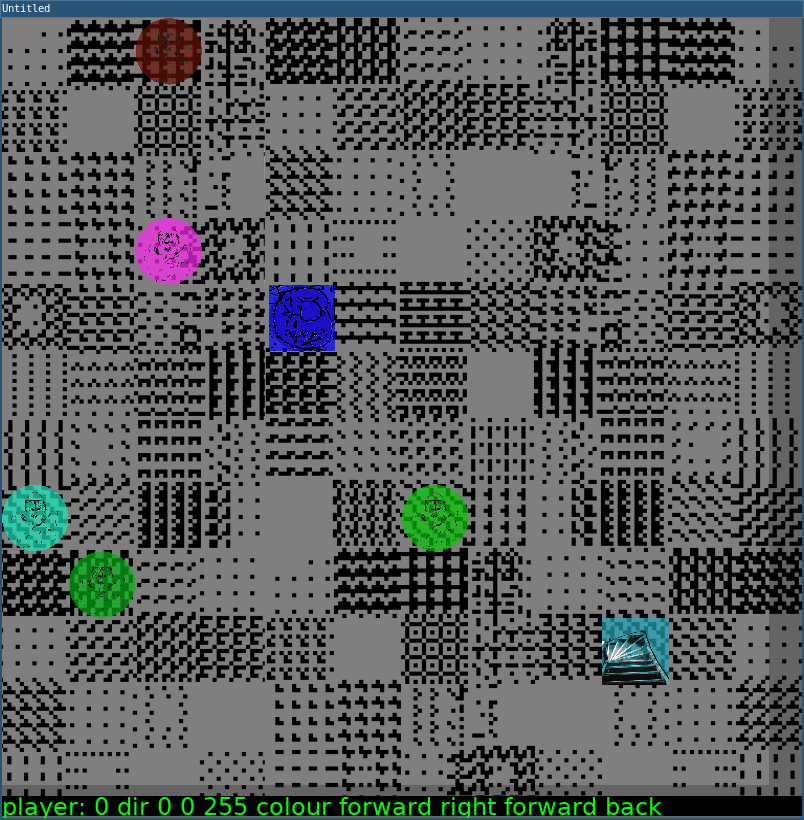
Cellars All The Way Down is a game and set of levels written in Cellarscript. It is a quasi-roguelike where the player specifies a cellarscript file to program their playerbot. The goal is for the playerbot to reach the cellar staircase on each floor of the 12x12 grid cellar, and without dying, descend all the way to the bottom (level 6 is the current final cellar level), to escape and win the game. Hitting into a roving monster entity immediately kills the player and the game must be restarted from the beginning (permadeath).
To play
The game loads the cellar1 file to begin. A terminal is at the bottom of the cellar level. See the dictionary of incantation words below. A player enters an incantation, paying attention to their typing so as not to anger the entities. Pressing return runs the current incantation and the entities respond, running their programs from the current cellar file. A player loses if they collide with any other entity other than the stairs. Upon succesfuly reaching the stairs, a player descends to the next cellar level.
To build from source
- Install Love2d
- Download or clone the cellarscript directory to your computer
- Open the cellarscript file and write your cellarscript code.
Cellarscript language
cellarscript language is an interpreted language. It is used both in a game’s cellarscript file as well as in in-game incantations written in the interactive game terminal. The cellarscript file is loaded at the start of a level. The in-game interactive terminal is the main mode of playing the game where a player writes a line of incantations (up to 55 characters, including spaces) for the player entity to enact. Pressing return sends the incantation for interpretation. Pressing backspace deletes the entire line of the incantation to begin again. Beware angering the entities with typos and greediness!
Each line of a cellarscript file consists of an entity and its
incantation. The entity is the player, a monster, or whatever you
specify, appended by a colon (:) and then a short
incantation (script) for it to act on. In the interactive game
terminal, it is understood that the entity acting is the player and so
the entity name should not be entered by the player there.
Although this should not come up, the entities want you to know that cellarscript is a 1-indexed language.
Comments and Warnings
Typos
Typos will anger the entities. Too many typos in your incantation will cause the enemies to kill the player.
Being greedy
The entities do not like greedy players. Player incantations longer than 55 characters will kill the player.
Comments
Comments are simply lines that begin with comment: or
note:
note: I can write notes to myself here
comment: and here
Sometimes it is useful to turn off a line of code with a comment for debugging purposes. Note the syntax.
note: the next line is commented out too
note:monster: forward right right back
Incantation words
xy
Sets placement of an entity. The top of the stack is the y column placement. The next number on the stack is the x row placement.
monster: 3 1 xy
This places the monster entity at 3 columns over, 1 column down (top).
forward
Moves the entity forward one step in whichever direction it faces.
back
Moves the entity back one step.
right
Turns the entity 90 degrees to the right.
left
Does the opposite of right :p
rand
Move the entity one square in any of the 4 cardinal directions from its current position.
If the position of the entity hasn’t been set previously with
xy, then rand will cause it to move anywhere
randomly on the level.
Note: If rand is called prior to calling xy
in a script then xy will overwrite the random placement
with positions from the stack.
Example:
monster: 3 1 xy rand rand
Places the monster at 3,1 and moves it over a random adjacent position twice.
stairs: rand
Places the stairs somewhere randomly on the level.
randdir
Rotates the monster a random direction, either 0
(right), 90 (down), 180 (left), or
270 (up).
dir
Rotates the entity in a cardinal direction. Specified input should be
0, 90, 180 or
270.
wait
Does what it says on the tin.
.s
Prints out the stack, visual output.
stack_length
Prints out the length of the stack.
words
Lists all words in the dictionary.
help
Prints out helpful information that the entities want a player to know about the game.
colour
Consumes 3 numbers from the stack to set entity’s colour in RGB.
Note that it consumes and sets the RGB colour in reverse order: BGR.
So 0 0 255 colour is the colour blue*.
Do not anger the entities. Only the korrect spelling of colour will be honored.
randcolour
A special incantation word to produce a random
colour.
monster: randcolour rand
Will place a randomly colored monster on a randomly selected grid
space.
reset
Resets the level. Type this incantation to begin again.
Special entities
At minimum, there should be a player entity on each
level. Without a stairs entity there is no way to win a
level.
player:
A player is a special defined entity representing the player of the game. Beyond this, their incantations are interpreted no different than any other entity.
stairs:
Stairs is a special defined entity and specifies the target endpoint of a level. A player entity beats a level by landing on the stairs, unscathed.
Download
Install instructions
- If you have Love2d already, you can just run the cellars.love file
- If you have Windows, run the windows.exe executable
- If you have Linux or Mac, run the cellars executable game file
Comments
Log in with itch.io to leave a comment.
Looking forward to unpacking this mystery!